Parameter Store
AWS Systems Manager Parameter Store is used to centrally store values that can be used by services and functions.
Steps
flowchart LR
  A[1. Create a new parameter]
  B[2. Update value of parameter];
  C[3. Use parameter]
  A --> B --> C
Step 1: Create a new parameter
Edit the parameters-property of the SSM Parameter Store module.
In this example, a new parameter named SvarUt/BaseUrl is added:
| ssm.tf | |
|---|---|
Create a Pull Request to Terraform apply this change.
Note that parameters created by this module are prefixed with /${environment}/${application_name}/.
In this example, the resulting parameter receives the name: /test/kattehotell/SvarUt/BaseUrl.
Step 2: Update value of parameter
- Log in to the AWS Account's console: https://bymoslo.awsapps.com/start
- Navigate to AWS Systems Manager > Parameter Store.
- Navigate to the parameter you just created (for example, in this example
/test/kattehotell/SvarUt/BaseUrl). - Click Edit.
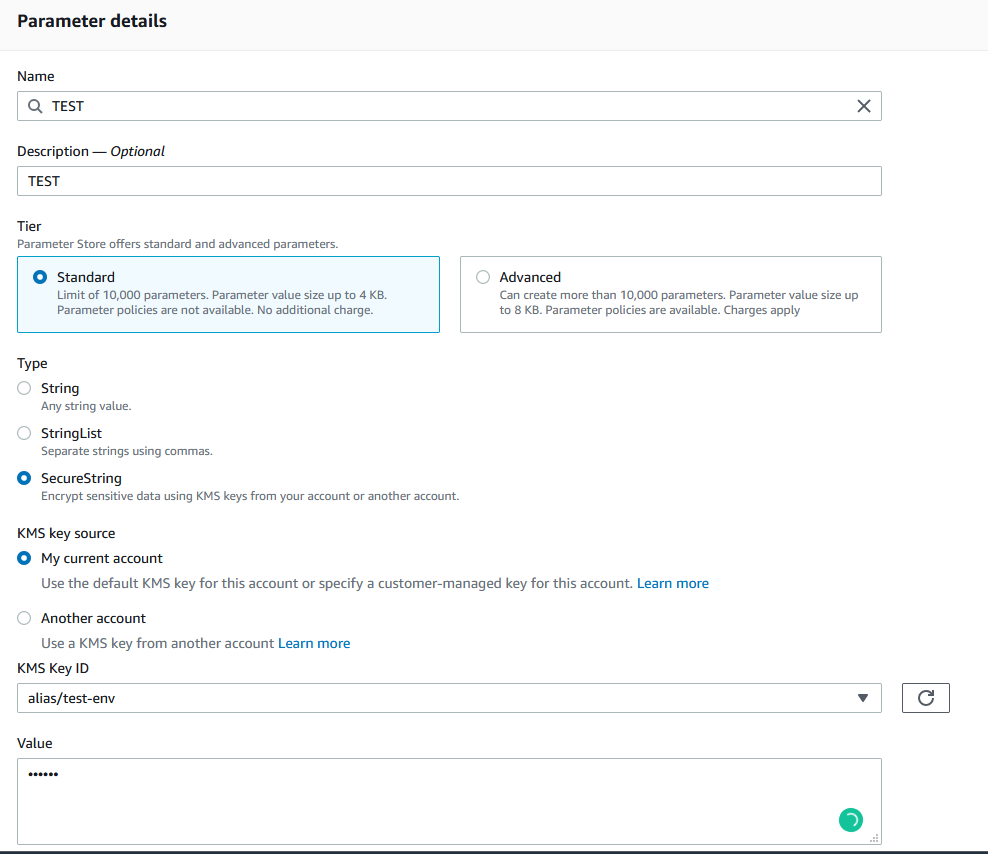
- Update the value and press Save Changes.
Step 3: Use the parameter in application
ECS Fargate
To use this parameter in an existing Fargate, add a new entry in ssm_secrets that references to the ARN of the parameter you've created.
| main.tf | |
|---|---|
After this change has been applied, the parameter value is available as an environment variable.
In this example, the parameter value is reachable under the environment variable SVARUT_BASEURL.
AWS Lambda Function
To use this parameter in an existing Lambda Function, retrieve the parameter value using the data source aws_ssm_parameter, and feed its output to environment_variables:
Note
Some Terraform Infrastruktur-repos have more than one SSM Parameter Store module. In such cases, create one data source per module, for example:
Create a Pull Request to Terraform apply this change.
After this change has been applied, the parameter value is available as an environment variable.
In this example, the parameter value is reachable under the environment variable SVARUT_BASEURL.